

If you follow the news on the AWS Compute Blog, you may have noticed that AWS Step Function now supports over 200 AWS Service integrations via AWS SDK Integration . And of course, developers can test their state machines locally using Step Functions Local before deploying them to an AWS account.
If you're interested in, you can read more about mocking service integrations with AWS Step Functions Local on the AWS Compute Blog
AWS Step Functions Local
AWS Step Functions Local is a downloadable version of Step Functions that lets you develop and test applications using a version of Step Functions running in your own development environment. The local version of Step Functions can invoke AWS Lambda functions, both in AWS and while running locally. You can also coordinate other supported AWS services.
Step Functions Local comes in two versions, Java and Docker. In this blog post, I will use the Docker version.
An ASL story 📚
You may have noticed that the state machines are defined using the Amazon States Language (ASL).
When you work with CloudFormation templates or the Serverless Application Model (AWS SAM), you can create a state machine resource by providing an ASL definition, within your template or in a JSON file.
It is also this ASL definition file that you use to create you state machine on Step Functions Local.
aws stepfunctions create-state-machine \
  --endpoint-url http://localhost:8083 \
  --definition file://$PWD/your-state-machine-definition.json \
  --name "LocalTesting" \
  --role-arn "arn:aws:iam::123456789012:role/DummyRole"
What about the CDK ?
An AWS CDK app is an application written in TypeScript, JavaScript, Python, Java, or C# that uses the AWS CDK to define AWS infrastructure.
So you define your state machine in TypeScript, JavaScript, Python, Java, or C#, using a Construct library.
When the CDK synthesizes your application, it causes the resources defined in it to be translated into an AWS CloudFormation model and generates your state machine definition in ASL. As you can see, you don't write the ASL directly, but it is generated by the CDK.
Extract ASL definition from the AWS CDK
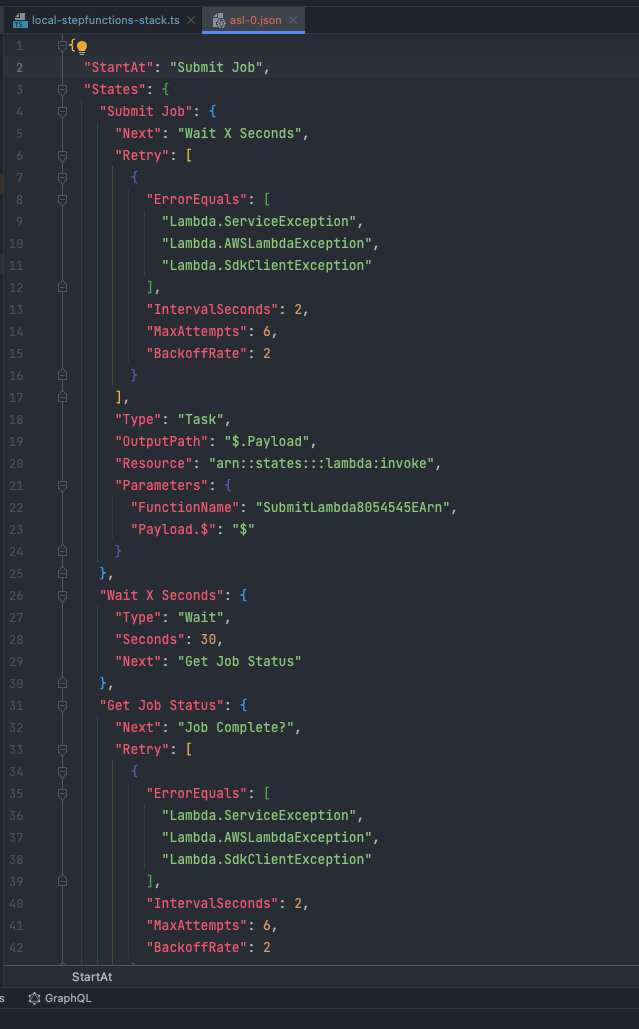
The CDK doesn't offer a feature to extract the ASL definition of a state machine, so how do you go from this:

to this ?
The manual way ✍️
As I said, the CDK generates CloudFormation templates. You can go inside cdk.out/ directory and find inside your CloudFormation template your
state machine definition

As you can see, it can be quite tedious to put all these pieces together...
The automatic way 🤖
So I decided to write a small utility to make your work easier, cdk-asl-extractor, it is available on npm.
It parses the DefinitionString property of a AWS::StepFunctions::StateMachine, resolves intrinsic functions and generates an ASL definition file.
We can now test our state machine with Step Functions Local since we now have our ASL definition file.
To our tests 🧪
So I'm going to use my utility to extract my state machine definition and use it to create my state machine in my Step Functions Local Docker container.
npm install -g cdk-asl-extractor
Synth and Extract
I'm using the sample from the AWS Step Functions Construct Library, the Step Functions Job Poller. It creates an AWS Batch job poller. It implements an AWS Step Functions state machine that uses AWS Lambda to create a Wait state loop that checks on an AWS Batch job.

Once my CDK app set up, I will translate the resources defined into an AWS CloudFormation template using the cdk synth command.
The next step is to locate my CloudFormation template, it should be inside cdk.out/ directory.
Then I can run my tool:
cdk-asl-extractor <path-to-your-cloudformation-json-file>
{
  "StartAt": "Submit Job",
  "States": {
    "Submit Job": {
      "Next": "Wait X Seconds",
      "Retry": [
        {
          "ErrorEquals": [
            "Lambda.ServiceException",
            "Lambda.AWSLambdaException",
            "Lambda.SdkClientException"
          ],
          "IntervalSeconds": 2,
          "MaxAttempts": 6,
          "BackoffRate": 2
        }
      ],
      "Type": "Task",
      "OutputPath": "$.Payload",
      "Resource": "arn:aws:states:::lambda:invoke",
      "Parameters": {
        "FunctionName": "SubmitLambda8054545EArn",
        "Payload.$": "$"
      }
    },
    "Wait X Seconds": {
      "Type": "Wait",
      "Seconds": 30,
      "Next": "Get Job Status"
    },
    "Get Job Status": {
      "Next": "Job Complete?",
      "Retry": [
        {
          "ErrorEquals": [
            "Lambda.ServiceException",
            "Lambda.AWSLambdaException",
            "Lambda.SdkClientException"
          ],
          "IntervalSeconds": 2,
          "MaxAttempts": 6,
          "BackoffRate": 2
        }
      ],
      "Type": "Task",
      "OutputPath": "$.Payload",
      "Resource": "arn:aws:states:::lambda:invoke",
      "Parameters": {
        "FunctionName": "CheckLambda9CBBF9BAArn",
        "Payload.$": "$"
      }
    },
    "Job Complete?": {
      "Type": "Choice",
      "Choices": [
        {
          "Variable": "$.status",
          "StringEquals": "FAILED",
          "Next": "Job Failed"
        },
        {
          "Variable": "$.status",
          "StringEquals": "SUCCEEDED",
          "Next": "Get Final Job Status"
        }
      ],
      "Default": "Wait X Seconds"
    },
    "Job Failed": {
      "Type": "Fail",
      "Error": "DescribeJob returned FAILED",
      "Cause": "AWS Batch Job Failed"
    },
    "Get Final Job Status": {
      "End": true,
      "Retry": [
        {
          "ErrorEquals": [
            "Lambda.ServiceException",
            "Lambda.AWSLambdaException",
            "Lambda.SdkClientException"
          ],
          "IntervalSeconds": 2,
          "MaxAttempts": 6,
          "BackoffRate": 2
        }
      ],
      "Type": "Task",
      "OutputPath": "$.Payload",
      "Resource": "arn:aws:states:::lambda:invoke",
      "Parameters": {
        "FunctionName": "CheckLambda9CBBF9BAArn",
        "Payload.$": "$"
      }
    }
  },
  "TimeoutSeconds": 300
}
Mock configuration
Now that we have our ASL definition, let's write our Mock configuration
{
  "StateMachines": {
    "LocalTesting": {
      "TestCases": {
        "HappyPathTest": {
          "Submit Job": "SubmitJobLambdaMockedSuccess",
          "Get Job Status": "GetJobStatusLambdaMockedSuccess",
          "Get Final Job Status": "GetFinalJobStatusLambdaMockedSuccess"
        }
      }
    }
  },
  "MockedResponses": {
    "SubmitJobLambdaMockedSuccess": {
      "0": {
        "Return": {
          "StatusCode": 200,
          "Payload": {
            "statusCode": 200,
            "body": "{\"approved\": true, \"message\": \"submit job passed\"}"
          }
        }
      }
    },
    "GetJobStatusLambdaMockedSuccess": {
      "0": {
        "Return": {
          "StatusCode": 200,
          "Payload": {
            "status": "SUCCEEDED"
          }
        }
      }
    },
    "GetFinalJobStatusLambdaMockedSuccess": {
      "0": {
        "Return": {
          "StatusCode": 200,
          "Payload": {
            "jobName": "my-job",
            "jobDefinition": "arn:aws:batch:us-east-2:123456789012:job-definition/SampleJobDefinition-343f54b445d5312:1",
            "jobQueue": "arn:aws:batch:us-east-2:123456789012:job-queue/SampleJobQueue-4d9d696031e1449",
            "wait_time": 60
          }
        }
      }
    }
  }
}
Deploy on AWS Step Functions Local
If you're using the Docker version of Step Functions Local, you can provide the mock configuration file using an environment variable only. In addition, you must mount the mock configuration file onto the Step Functions Local container at the initial server boot-up.
- We are going to mount the mock configuration file onto any directory within the Step Functions Local container. Then, set an environment variable named
SFN_MOCK_CONFIGthat contains the path to the mock configuration file in the container.
docker run -p 8083:8083
--mount type=bind,readonly,source={absolute path to mock config file},destination=/home/StepFunctionsLocal/MockConfigFile.json
-e SFN_MOCK_CONFIG="/home/StepFunctionsLocal/MockConfigFile.json" amazon/aws-stepfunctions-local
- After creating and providing a mock configuration file to Step Functions Local, we execute the state machine configured in the mock configuration file using mocked service integrations. Then check the execution results using an API action.
aws stepfunctions create-state-machine \
  --endpoint-url http://localhost:8083 \
  --definition file://$PWD/your-asl-definition.json \
  --name "LocalTesting" \
  --role-arn "arn:aws:iam::123456789012:role/DummyRole"
Output:
{
    "stateMachineArn": "arn:aws:states:us-west-2:123456789012:stateMachine:LocalTesting",
    "creationDate": "2022-02-04T01:23:25.875000+01:00"
}
- Run the state machine using mocked service integrations.
To use the mock configuration file, make a StartExecution API call on a state machine configured in the mock configuration file. To do this, append the suffix, #test_name, to the state machine ARN used by StartExecution. test_name is a test case, which is configured for the state machine in the same mock configuration file.
aws stepfunctions start-execution \
    --endpoint http://localhost:8083 \
    --state-machine arn:aws:states:us-east-1:123456789012:stateMachine:LocalTesting#HappyPathTest
Output:
{
    "executionArn": "arn:aws:states:us-west-2:123456789012:execution:LocalTesting:5a3212da-ed8a-4ad8-8b90-c6974a8c9c52",
    "startDate": "2022-02-04T01:24:03.815000+01:00"
}
- Check the execution's results by making a
ListExecutions,DescribeExecution, orGetExecutionHistoryAPI call.
aws stepfunctions get-execution-history \
    --endpoint http://localhost:8083 \
    --execution-arn arn:aws:states:us-west-2:123456789012:execution:LocalTesting:5a3212da-ed8a-4ad8-8b90-c6974a8c9c52
To go further 🚀
What if I told you that it is also possible to directly test your state machine in the CDK with Jest?
Ken Fukuyama (@kenfdev) created a PoC that sends the ASL to Step Functions Local via the AWS SDK and run Jest. You can find his PoC on GitHub thank you for his work!
Please fell free to share and follow me on Twitter (@nathanagez) to stay in touch! Give a star and don't hesitate to contribute to the parser on GitHub. It really created lots of possibilities !